.png?width=1322&height=525&name=LEANSITE%20LOGO%20(COLORED).png)
Before you start
Use the Leansite CSV template. Give every property a consistent name and a complete address before you upload; a bulk import cannot make ambiguous source data reliable. Keep a copy of the original file so you can trace a correction back to its source.
Import the file
Open My Property, choose the CSV import option and select Upload CSV.
Download the CSV template from the upload screen. Enter your property data in that template, then select the completed file to upload.
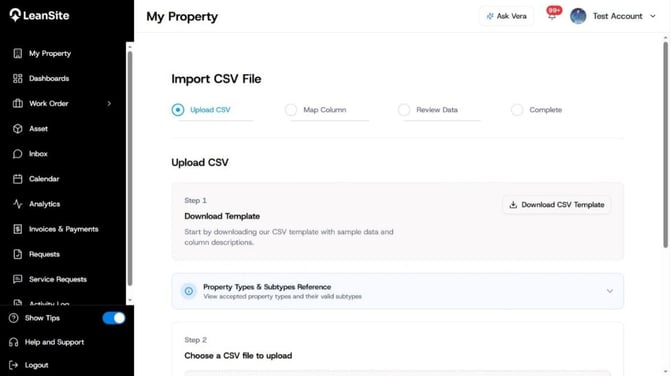
My Property Import via CSV- Frame 1
Continue to Map Columns. Match each column from your CSV with the equivalent Leansite field. Read the source-column heading before mapping it; a familiar-looking heading can still contain the wrong type of information.
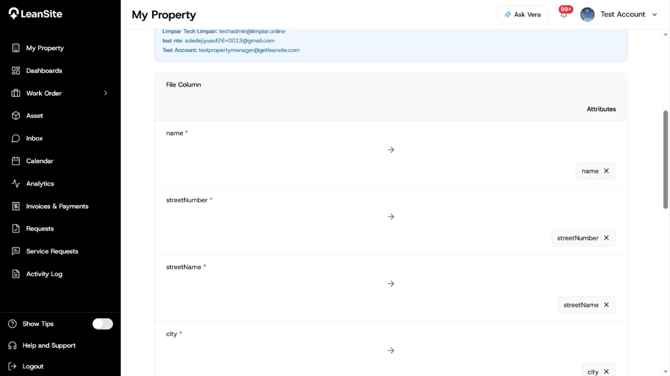
Mapping Columns After CSV Upload
Move to Review Data. Leansite separates the rows it can accept from rows that need attention. Resolve the marked issues in the source file before importing; do not rely on memory to repair a large batch later.
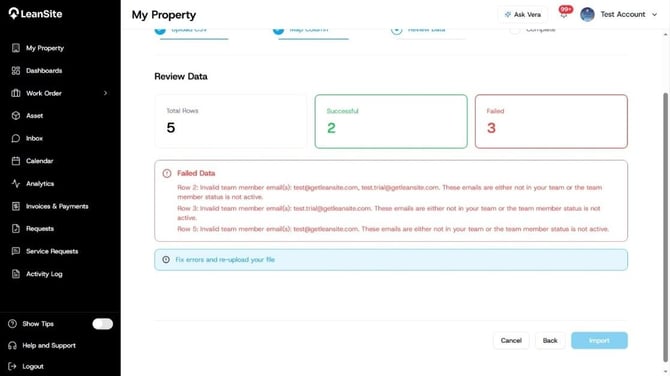
Review your columns after import and mapping
When every important issue has been resolved, select Import. Keep the completion view open until you have checked the result.
What happens next
The import creates property records from the accepted rows. Open My Property and check a small sample across the portfolio: one property with a straightforward address, one with a more complex address, and one from each important category. This catches a systematic mapping mistake far earlier than waiting for the first service request.
Common problems
A row is marked as failed. Correct the stated field in the CSV, then run the corrected import. Treat the error message as the source of truth for that row rather than guessing which column Leansite rejected.
The properties are present, but the data looks inconsistent. Check the template headings and the mappings you selected. Correct the source data before uploading a new batch, otherwise, the same inconsistency will be repeated.
You are unsure whether a property was imported twice. Search for the property before importing a corrected file. Use one stable naming convention and keep an import log with the date, file name and number of intended properties.