.png?width=1322&height=525&name=LEANSITE%20LOGO%20(COLORED).png)
Create a service-request template to collect the facts an FM needs to assess an issue without making the requester complete a long form. The template can capture the location, issue, urgency, photo and optional contact details; every submitted request then enters the FM review queue for a deliberate decision.
Applies to
Administrators who manage service-request forms and request intake.
What this does and does not do
A template structures request intake. It does not assign work to a vendor or internal team automatically. An FM reviews each request and decides whether to create a work order, request more information, merge it with an existing request or dismiss it.
Before you start
Decide what the FM needs to assess the request: issue category, description, room or area, urgency and a photo are common essentials. Contact information should be optional where the requester may need an update. Do not use a template to promise automatic vendor routing: every submitted request enters an FM-reviewed queue.
Create a template
- Open Service Requests and select the Templates view.
- Select New Form Template.
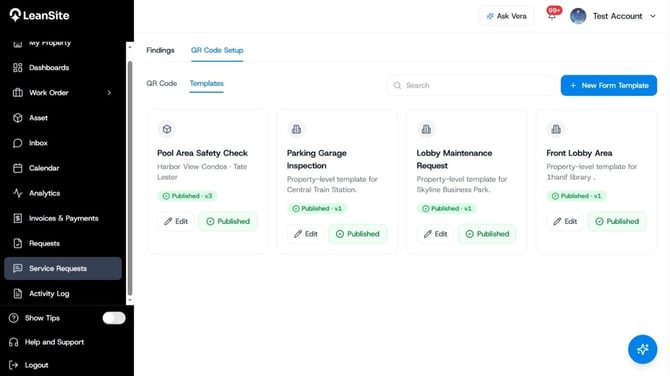
Service Request Page-Templates
Place after step 2. Highlight the Templates area, existing template cards and New Form Template action.
- Enter a clear Form Name, then select the property or scope shown in the set-up screen and the appropriate service category or issue grouping.
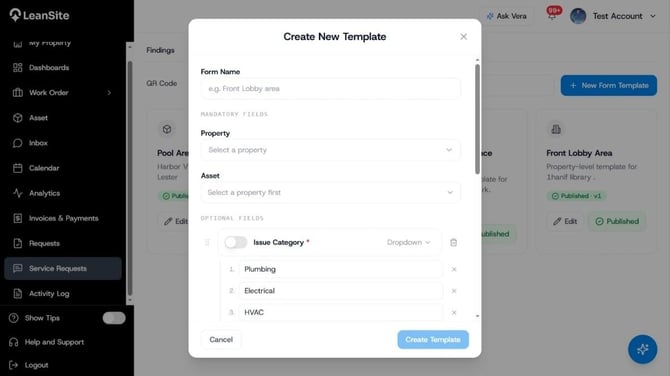
Number 1 New Form Template
Place after step 3. Annotate Form Name, Property and category selection.
- Add the questions the requester must answer. Build around the information needed to identify the issue and its context: issue category, a short description, room or area, urgency and a photo upload where visual evidence will help. Add email or phone only when the FM needs a route for follow-up.
- Mark only essential questions as required. Use the two urgency options, Standard and Urgent, in language the requester can understand.
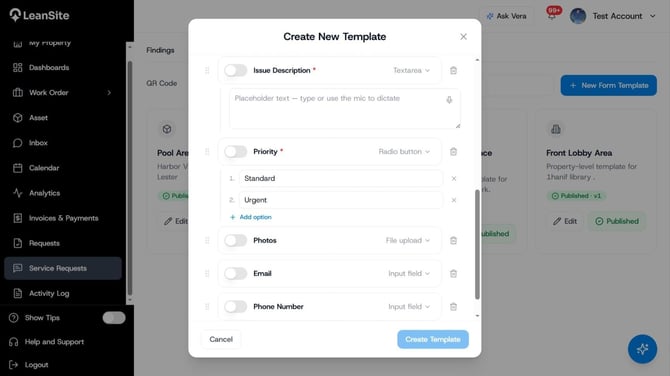
Number 2 New Form Template
Place after step 5. Highlight the question list, field-type controls and required-field control. Use the screenshot’s live labels in final annotations.
- Create the template, then test it as a requester on a mobile device. Check that the labels are plain, the location can be understood without internal jargon and the completed request provides enough information for an FM to choose a next action.
Expected result
The template is available for service-request intake and can be linked to the appropriate QR code. Every submitted request enters the FM queue, where the FM can create a work order, request more information, merge the request with an existing one or dismiss it.
If the requester gives contact information, they can receive an update after that disposition. The template should therefore collect contact details only where the organisation is prepared to use them responsibly.
Keep templates useful
Create a separate template where the facts required for triage are materially different. A water-leak form may need urgency, a photo and room location; a routine cleaning request may need a preferred time and access information. A generic form pushes the missing detail into messages later and slows the FM’s decision.
Review a template after repeated clarification requests. Add or improve the field that repeatedly causes follow-up; remove a field that is rarely completed or has no effect on triage. Test any changed template and every linked QR code before distributing it again.
If the form is not producing usable requests
- Requesters leave out the same information. Add a short, plain-language required field only where the FM needs the answer to make a triage decision.
- The form is too long to complete on site. Remove fields that do not affect the FM’s next action. Keep location, issue description and urgency clear.
- A QR code opens the wrong form after a change. Remove the code from use and test the template and linked QR code again before redeployment.