.png?width=1322&height=525&name=LEANSITE%20LOGO%20(COLORED).png)
Create a marketplace work order when a job needs an external provider and you are not assigning it to an internal team or a known preferred vendor. You will define the work, give vendors the information needed to respond, set the response and site-work times, and publish one traceable request for the property.
Applies to
FM Portal users who can create external work orders for an active property.
What this does and does not doPublishing a marketplace work order creates the request and its history. It does not guarantee a vendor response, approve work automatically or replace the organisation’s own approval and emergency procedures. Use the work-order record for the actions available after publication.
Before you startConfirm the property, the precise location or asset, the service category and the outcome required. Prepare photos, plans or inspection notes where they will help a vendor understand the job, and have the site contact, access restrictions and work window ready.
Choose the marketplace only where the job can be described clearly enough for an external provider to assess it. If the work is genuinely recurring, use the recurring-work-order process instead of repeatedly posting a one-off request.
Start an external marketplace request- Start a new work order from Work Order or from the relevant property record.
- Choose Marketplace. Use this route when you want the job offered beyond your established preferred-vendor relationship.
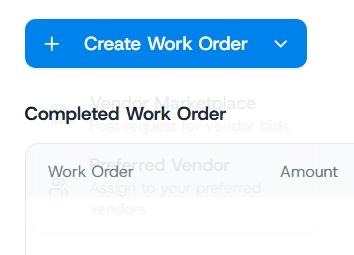
Choose the type of work order you want to create
Define a job vendors can price and deliver- Enter a short, specific title that states the problem and location. For example, “Repair leak in third-floor staff restroom” is more useful than “Plumbing issue”.
- In the description, explain the current condition, the result you expect and anything that affects delivery. Include facts a vendor cannot infer from the title, such as an occupied site, after-hours access, permit requirements or a required site contact.
- Select the relevant Service Category and set the available priority. Use priority to communicate operational urgency; it cannot compensate for an unclear scope.
- Add supporting documents when they materially reduce uncertainty. A marked plan, recent inspection note or clear photograph can prevent follow-up questions and proposals that cannot be compared fairly.
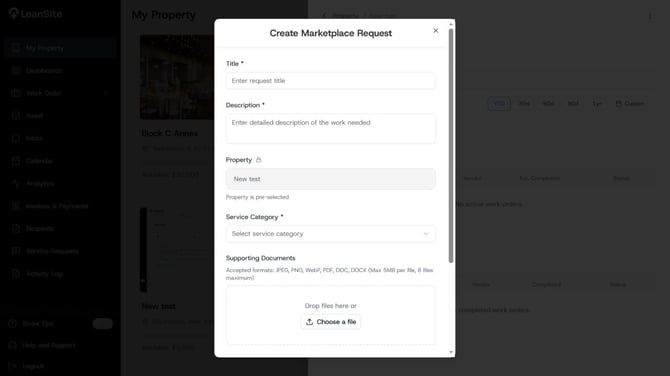
Creating a marketplace work order
Set the marketplace response and work timing
- Complete the response, bidding and work-timing fields shown in the marketplace flow. Give providers enough time to understand the scope and respond; a very short response deadline may be necessary for a real emergency, but it usually limits the quality and number of usable responses.
- Set the date and time the site can receive work. Record access constraints in the description as well, particularly when a provider must arrange arrival with someone on site.
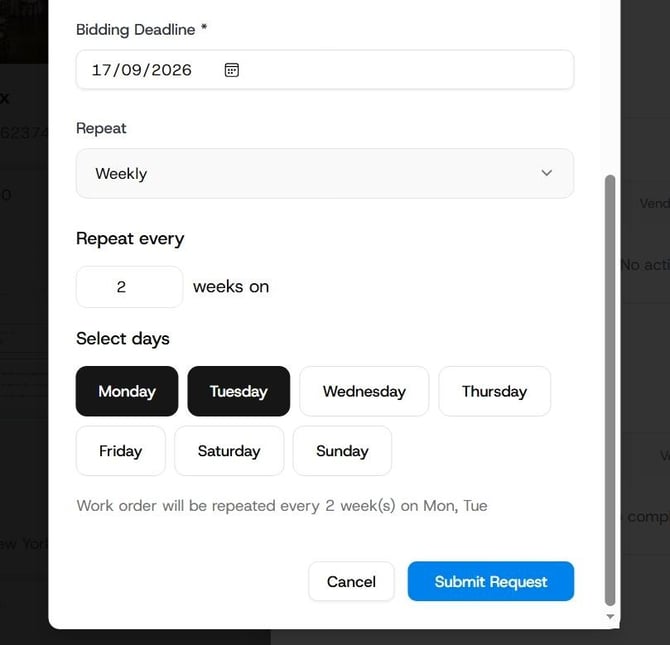
Set bidding specifics and deadlines
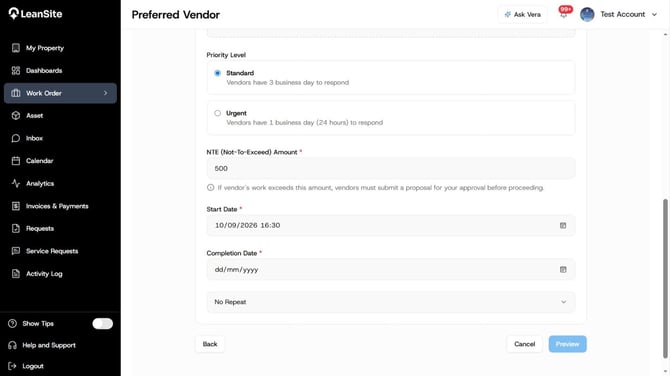
Set time and date work would begin
Review and create the work order
- Review the property, location or asset, scope, attachments, category, priority, response deadline and work window as one record. Another person should be able to understand the request without asking the original requester for the basics.
- Create the work order, then open its record to follow the marketplace response and the next action available to you. Keep clarification, decisions and scope changes against the same record rather than creating a duplicate order for the same issue.
Expected result
The marketplace work order becomes an external work record for that property. Open the record to follow vendor responses and use the quote or approval actions available to your organisation.
If you need to correct the request
- The scope, property or timing is wrong. Correct the existing record through the action available to you. Do not create another order for the same issue.
- The job is urgent or safety-critical. Follow your organisation’s emergency process first. Do not rely on a marketplace response window as an emergency escalation route.
- You already know the provider that should do the work. Use the preferred-vendor work-order route instead of creating a marketplace request.
Write a scope vendors can act on
A useful scope answers five questions: what is wrong, where it is, what a satisfactory result looks like, when work can happen and what conditions affect access or safety. Keep security codes, personal data and unrelated tenant information out of attachments; provide sensitive operational details only through the approved route after a provider is selected.