.png?width=1322&height=525&name=LEANSITE%20LOGO%20(COLORED).png)
This guide covers the current FM Portal assistant, including asking for help, refining a request and viewing conversation history.
Before you startSign in to the FM Portal. Do not enter passwords, banking details, private access credentials or unnecessary personal data in a conversation.
1. Open VeraSelect Ask Vera at the top of the FM Portal. The assistant opens alongside your current work so you can describe what you need help with.
2. Describe one task clearlyStart with the outcome you need. Include the relevant type of record or workflow, such as a work order, NTE request, service request or property. For example:
I need help reviewing an NTE request for an existing work order.
Keep the first message focused. Vera may ask whether you are creating a new record or working with an existing one, which property is involved, the service category, the budget amount or the work-order reference.
3. Answer the clarification questionsProvide the details needed to identify the correct process. In the NTE example, Vera separates new-work-order guidance from an update to an existing work order, then asks for the appropriate property, trade, budget or reference ID.
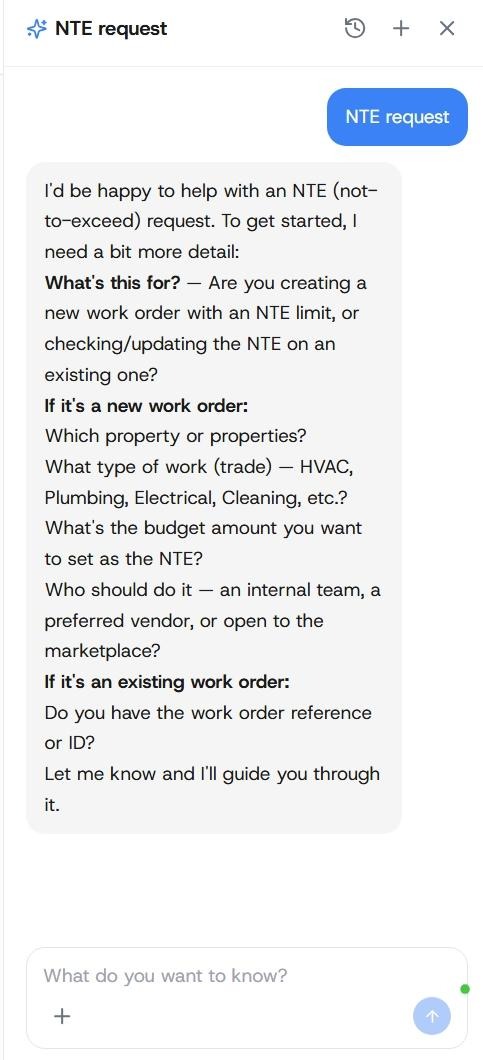
aAlt text: Vera asking clarification questions about a new or existing work order and an NTE request.
4. Follow the guidance in the relevant moduleUse Vera’s response to locate and understand the workflow. Open the underlying property, work order, request or analytics page before changing a record or making a financial decision. The current release-note scope supports navigation help, facilities-management knowledge and advisory guidance. It does not support treating Vera’s answer as a live record, completed product action or final approval.
5. Continue or start a new conversationUse the message box for follow-up questions about the same task. Select the + control when you want to begin a separate topic.
6. Review conversation historyOpen History to view previous conversation threads. The history view shows each thread’s title, message count and relative date. Choose titles that make the subject recognisable later, and keep separate tasks in separate threads.
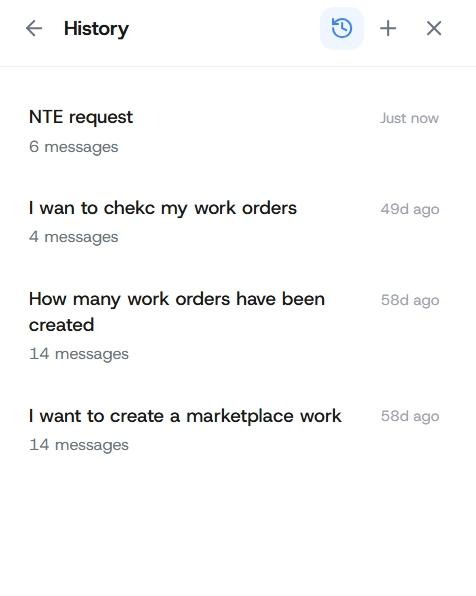
Alt text: Vera History showing earlier conversation titles, message counts and dates.
Expected resultYou receive contextual guidance for a clearly described facilities-management task and can return to the correct LeanSite module to verify the record or complete the action.
Current boundaries- Vera provides guidance in the FM Portal.
- Confirm live operational data in the underlying product record.
- Complete approvals and record changes through their normal LeanSite controls.
- A visible conversation history does not establish cross-conversation operational memory.
- AI Chat inside the dashboard builder is labelled Coming soon and should not be documented as available.
Add the missing property, record type, service category or work-order reference, then ask a narrower follow-up question. Open the relevant record directly when the answer depends on a current amount, status, permission or operational decision. Use Help and Support when the issue requires product support.
Related articles- Understand Budgets and Not-to-Exceed Limits
- Request and Review an NTE Increase
Get Help and Contact LeanSite Support